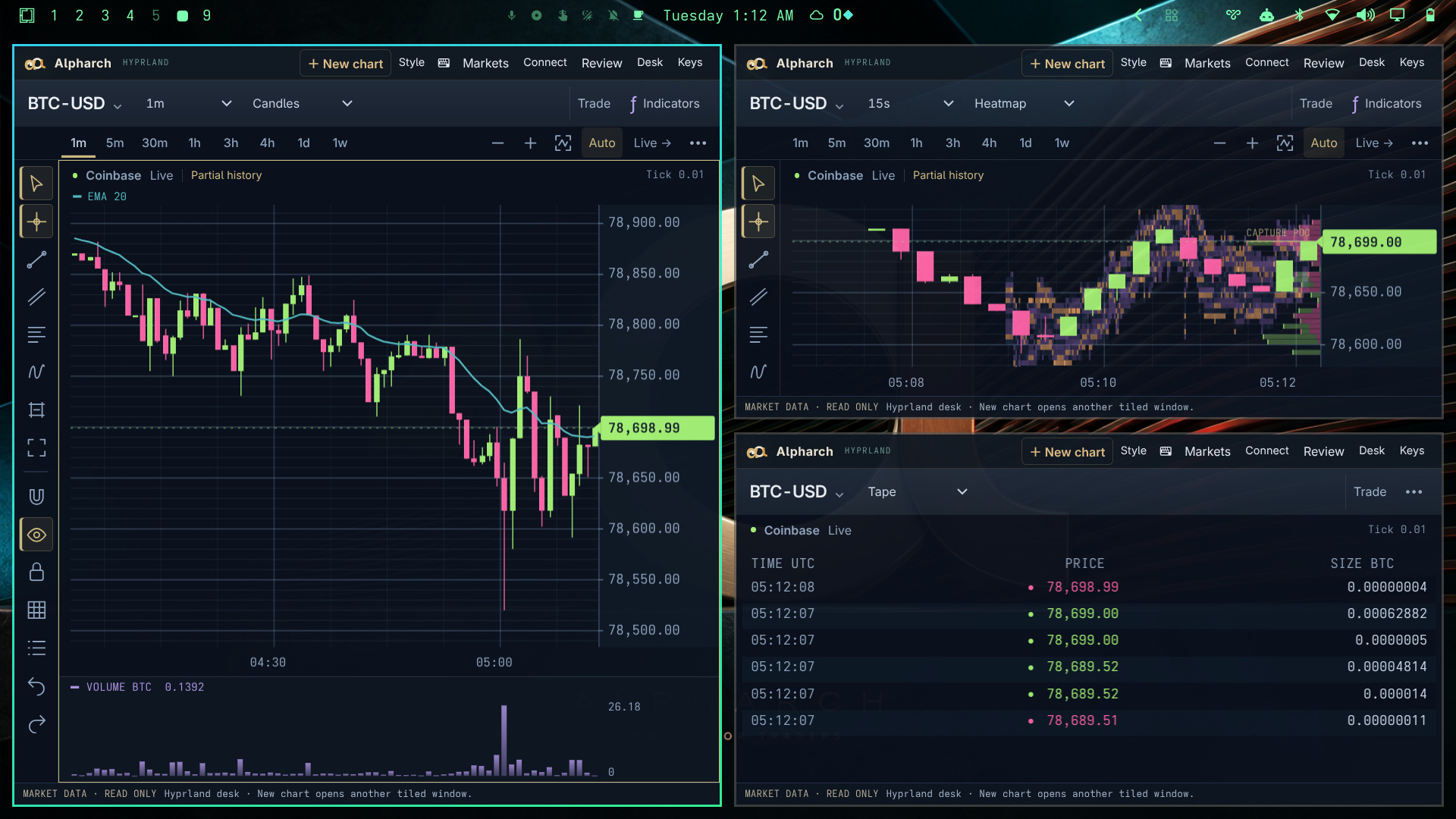
Your charts are real windows. Tile them, move them between workspaces and give the view that matters more room.
Alpharch is a free, open-source trading overlay built around Omarchy’s Hyprland desktop. Charting, order flow and replay for futures and crypto traders, using the desktop shortcuts you already know.
Omarchy provides the Linux desktop, tiling and keyboard workflow. Alpharch adds the charts, feeds, journal and trading theme. Install it on top of the Omarchy setup you already use.
Hyprland desk · three real chart windows on Omarchy · captured September 8, 2026.Real public market data. Static capture. Full size ↗
Light charts, dark charts, your own saved colors. Open Commands with Super+Alt+U to find a tool without leaving the keyboard. See the shortcuts →
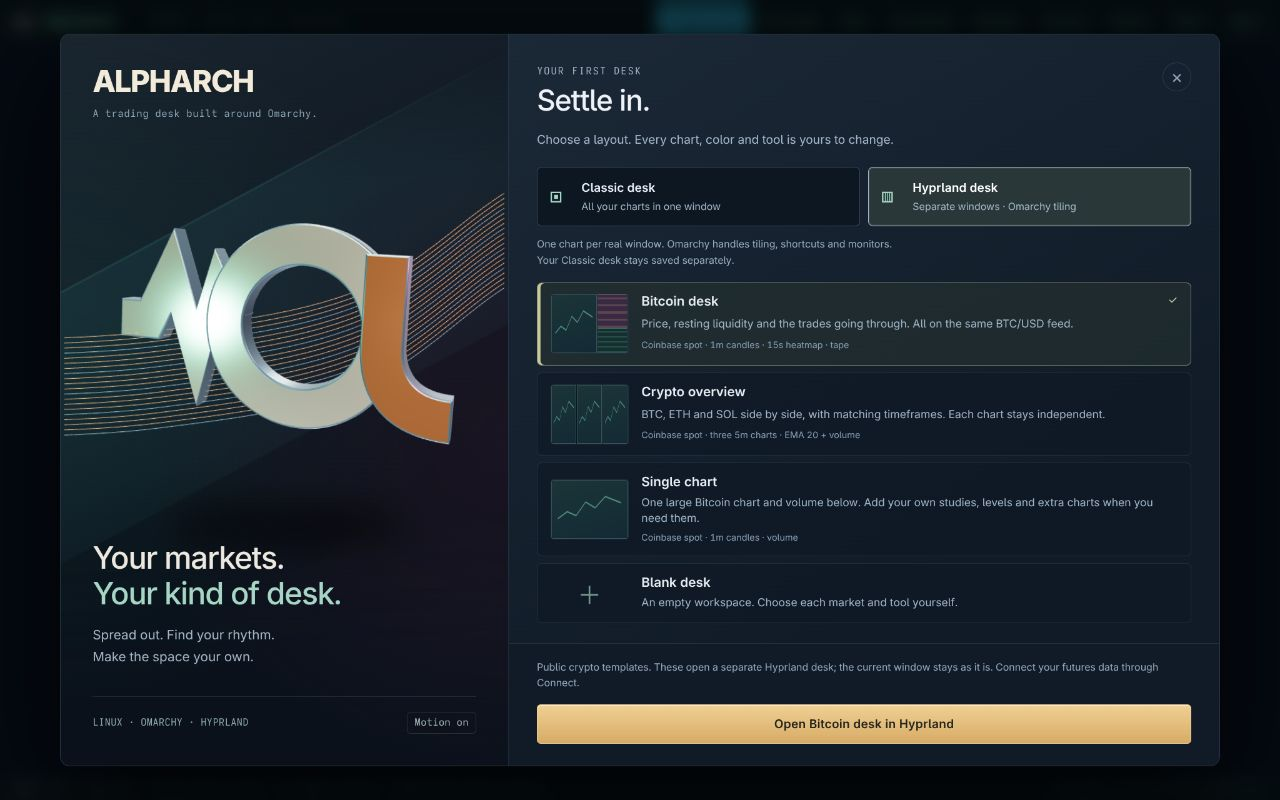
Choose Hyprland when you open Alpharch.
The current installer includes the native desk shown here. Already installed? Run alpharch update, then choose Hyprland desk on the opening screen. Public crypto feeds work today; futures connections are still in development. What’s available →
ALPHARCH / ON FILM
Watch the desk unfold.
Start with an empty desktop. Open your Hyprland desk. Make room for the charts you trade.
Recorded September 8. The new opening, Hyprland tiling, keyboard tools, RSI, chart themes and Coinbase order flow.Download film ↓What’s in the film
The film starts with the Alpharch logo and an empty Omarchy desktop, then shows the animated starting screen and a Bitcoin desk in separate Hyprland windows. Watch the windows resize and expand, find a trend-line tool from the keyboard, place its anchors, zoom the chart, add RSI, switch to a light chart, and inspect trade bubbles over the liquidity heatmap. Actual desktop recordings from the installed public preview, edited for length; loading pauses are shortened. Original instrumental music, no narration. This is a charting demonstration; it does not show broker order execution.
The goal is a proper home for intraday traders on Linux, with futures and crypto sharing the same charting and replay workflow.
FUTURES / IN DEVELOPMENT
ES and NQ are part of Alpharch.
The futures workflow is being built around dated contracts, exact tick prices, depth, tape and replay. The read-only Interactive Brokers bridge is implemented and has passed offline checks; testing with a signed-in gateway and exchange permissions is still pending.
Rithmic and CQG need their own adapters and provider access. Live broker execution is not implemented. Futures data subscriptions remain separate.
The live desk reads public Coinbase and Kraken spot data and Hyperliquid perpetual data. Deribit supplies optional crypto options context. These feeds are why the current screenshots and starting templates show crypto.
Captured VWAP and depth history start with received data. Missing trade classifications stay unknown.
Choose Hyprland desk on the opening screen, then pick a starting layout. Each chart opens as a real window for Omarchy to tile. Public crypto feeds let you get started without a broker login. Classic desk remains available if you prefer one window.
01
Bitcoin desk
A one-minute chart with volume, a liquidity heatmap and time & sales. All three read the same Coinbase BTC/USD feed.
Price · resting orders · trades
02
Crypto overview
BTC, ETH and SOL on matching five-minute charts, with a moving average and volume. A quick way to see what each market is doing.
Three markets · independent charts
03
Single chart
One large Bitcoin chart and volume below. Start here if you like a quiet screen, then add exactly what you need.
One market · room to work
Already have a setup in mind? Choose Blank desk and add your own charts. The opening chooser appears each time; saved desks remain available. ES/NQ presets are planned once their live-data workflow is verified.
Choose Hyprland desk, then your starting layout. Captured September 8, 2026. Classic desk remains an option.
03 / THE EVERYDAY TOOLS
Spend your attention on the chart.
Get closer to the tape.
Zoom time around the cursor. Stretch the price scale. Inspect the exact price and exchange timestamp. Switch between candles, heatmap, footprint, profile, ladder and tape.
Keep your studies where you want them.
Search for RSI, MACD, moving averages, Bollinger Bands, stochastic, VWAP or volume and delta tools. Edit the settings and colors, use a separate pane, and save your study template.
Bring your morning together.
The Daily combines your configured crypto watchlist, session clock, calendar and yesterday’s journal debrief. Open it before the session and save a copy to your journal.
Save your Hyprland charts, drawings and studies as a named desk. Record public feeds locally for review. Replay stays local to each Hyprland window; Classic supports several streams on one replay clock.
Let Omarchy do the window work.
Focus, swap, resize and move charts with your Hyprland shortcuts. Add a chart and the desktop tiles it alongside the others. Your workspaces, monitor setup and keyboard habits stay part of the workflow.
Keep the core workspace free. Add a hosted AI assistant when you want help bringing the session together.
The paid service is in planning. Pricing and included usage will be published before subscriptions open.
Before the open
A personalized morning brief with available overnight context, the economic calendar and levels from your connected data.
During the session
Updates around the levels you watch, with explanations of confirmed changes and links to the source and timestamp.
After the close
Replay bookmarks, journal summaries and recurring patterns in the sessions you choose to review.
These are planned subscription features. Existing charts, drawings, indicators, local replay, journals and the basic Daily remain free. The current optional Claude CLI integration remains available with your own model account.
Start with Omarchy installed, then add Alpharch with one command. Open Alpharch Live Desk or press SUPER+ALT+V, choose Hyprland desk, and pick a layout. Already installed? Run alpharch update first.
Your layouts, recordings and journal stay on your machine. The current Desk Brain uses your own Claude CLI to send selected context to its model provider. The planned hosted assistant will require explicit sharing controls; exchange data and optional AI services have separate costs.
 ALPHARCH